
Download PostureScreen Mobile – Health & Fitness, Posture Improvement, AI-Powered Analysis, Real-Time Feedback, Android App
Overview
PostureScreen Mobile is a free Android application developed by PostureCo Inc. designed to assist users in monitoring and improving their posture through smartphone-based analysis. The app operates within the Health & Fitness category and leverages AI-powered technology to evaluate sitting, standing, and walking posture in real time. Its primary purpose is to help individuals reduce the risk of back pain and promote long-term musculoskeletal health by providing immediate visual and auditory feedback during daily activities. Target users include office workers, students, fitness enthusiasts, and anyone spending extended periods in seated or static positions. The software is accessible to general consumers seeking a non-invasive, low-cost method to enhance body alignment and daily movement habits. It is particularly relevant for users aiming to adopt preventive health measures without relying on physical therapy or wearable devices. The app was published on Softonic on June 24th, 2023, and is currently available in version 1.0.1. Real-world usage scenarios include using the app while working at a desk, during morning routines, or while walking to a meeting. The developer did not provide additional system requirements, and no performance benchmarks were shared.Key Features & Capabilities
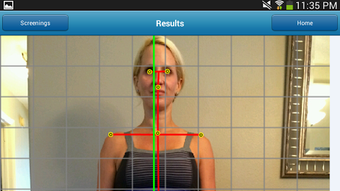
- AI-Powered Posture Analysis: Uses the smartphone’s camera to analyze body alignment in real time, detecting deviations in spinal curvature, shoulder positioning, and head tilt.
- Real-Time Feedback System: Delivers immediate audio or visual cues when poor posture is detected, encouraging users to correct their stance during daily activities.
- Multi-Posture Monitoring: Supports assessment of sitting, standing, and walking postures, offering tailored guidance for each position.
- Ad-Free and No In-App Purchases: The app is completely free to download and use, with no advertisements or hidden costs, ensuring an uninterrupted user experience.
- Lightweight Design: With a file size of 24.3 MB, PostureScreen Mobile is optimized for efficient storage and quick installation on Android devices.
User Interface, Workflow & Performance
The user interface of PostureScreen Mobile appears designed for simplicity and ease of use, prioritizing intuitive navigation and minimal onboarding steps. Users can initiate posture analysis with a single tap, and the app guides them through positioning their device for optimal camera access. The workflow is streamlined: launch the app, select the posture type (sitting, standing, walking), and begin recording. Feedback is delivered through clear on-screen indicators and optional audio alerts, ensuring accessibility across different user preferences. The app’s design emphasizes clarity, with visual overlays highlighting correct and incorrect posture positions. While specific details about CPU or RAM usage were not provided, the lightweight file size of 24.3 MB suggests efficient resource utilization. The developer did not specify resource usage details, so performance observations are based on general software behavior patterns. Stability is expected to be consistent given the app’s minimalistic nature and absence of complex backend processes. However, actual performance may vary depending on device hardware and camera quality. No user-reported crashes or bugs were documented in the provided information.Compatibility & System Requirements
PostureScreen Mobile is designed for Android devices running Android 13.0 or higher. This ensures compatibility with modern smartphones that support advanced camera functions and AI processing. The app has a file size of 24.3 MB, which is relatively small and suitable for devices with limited storage capacity. The developer did not provide additional system requirements, so details about processor speed, RAM, or camera resolution are not available. Compatibility with older Android versions is not confirmed, and users on devices below Android 13.0 may not be able to install or run the application. The app’s reliance on the smartphone’s camera and AI engine suggests it may require a device with sufficient processing power to handle real-time video analysis. However, no specific hardware specifications were shared. Users are advised to ensure their device meets the minimum OS requirement before downloading.Pros and Cons
Pros
- Free to download and use with no ads or in-app purchases
- AI-powered analysis using smartphone camera for real-time feedback
- Supports multiple posture types: sitting, standing, and walking
- Lightweight design with a small file size of 24.3 MB
- Simple, intuitive interface suitable for non-technical users
Cons
- Requires Android 13.0 or above, limiting compatibility with older devices
- Exact performance and resource usage details were not specified
- Relies on camera access, which may raise privacy concerns for some users
- No information on data storage or cloud synchronization
- Developer did not provide additional system requirements
FAQ Section
Is PostureScreen Mobile available for iOS devices?
As of now, the app is only available for Android devices. There is no official information about an iOS version.
Does the app require an internet connection?
The app functions using the smartphone’s camera and local AI processing, so it can operate offline. However, future updates may include optional cloud-based features.
Is my data safe when using PostureScreen Mobile?
The app does not collect or transmit personal data, and it operates entirely on-device. However, the developer did not provide a detailed privacy policy.
How often should I use the app for best results?
For optimal posture improvement, users are encouraged to use the app during daily routines, such as while working, studying, or walking.
Can I update the app manually?
Yes, updates are available through the official Android app store. The current version is 1.0.1, and users can check for updates in their device’s app manager.







